create database mydb1; # 数据库存在时会报错 create database if not EXISTS mydb1 ;
选择使用数据库:
1
use mydb1;
删除数据库:
1
2
drop database mydb1; # 数据库不存在时会报错 drop database if exists mydb1;
修改数据库编码:
1
alter database mysql1 character set utf8;
创建表:
1 2 3 4 5 6 7 8
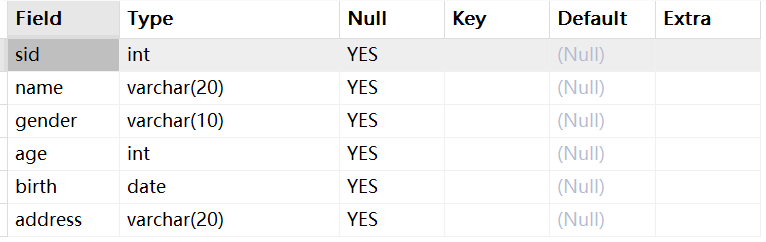
create table if not exists student( sid int, `name` varchar(20), gender varchar(10), age int, birth date, address varchar(20) );
对表结构的常用操作:
1
2
3
4
5
6
7
8
-- 查看当前数据库所有的表 show tables; -- 查看指定表的创建语句 show create table student; -- 查看表结构 desc student; -- 删除表 drop table student;
查看表结构:
修改表结构:
1
2
3
4
5
6
7
8
-- 添加列(添加一个字段) alter table student add dept varchar(20); -- 修改列名和类型 alter table student change dept department varchar(30); -- 删除列 alter table student drop department; -- 修改表名 rename table student to stu;
DML
数据插入
1 2 3 4 5 6 7
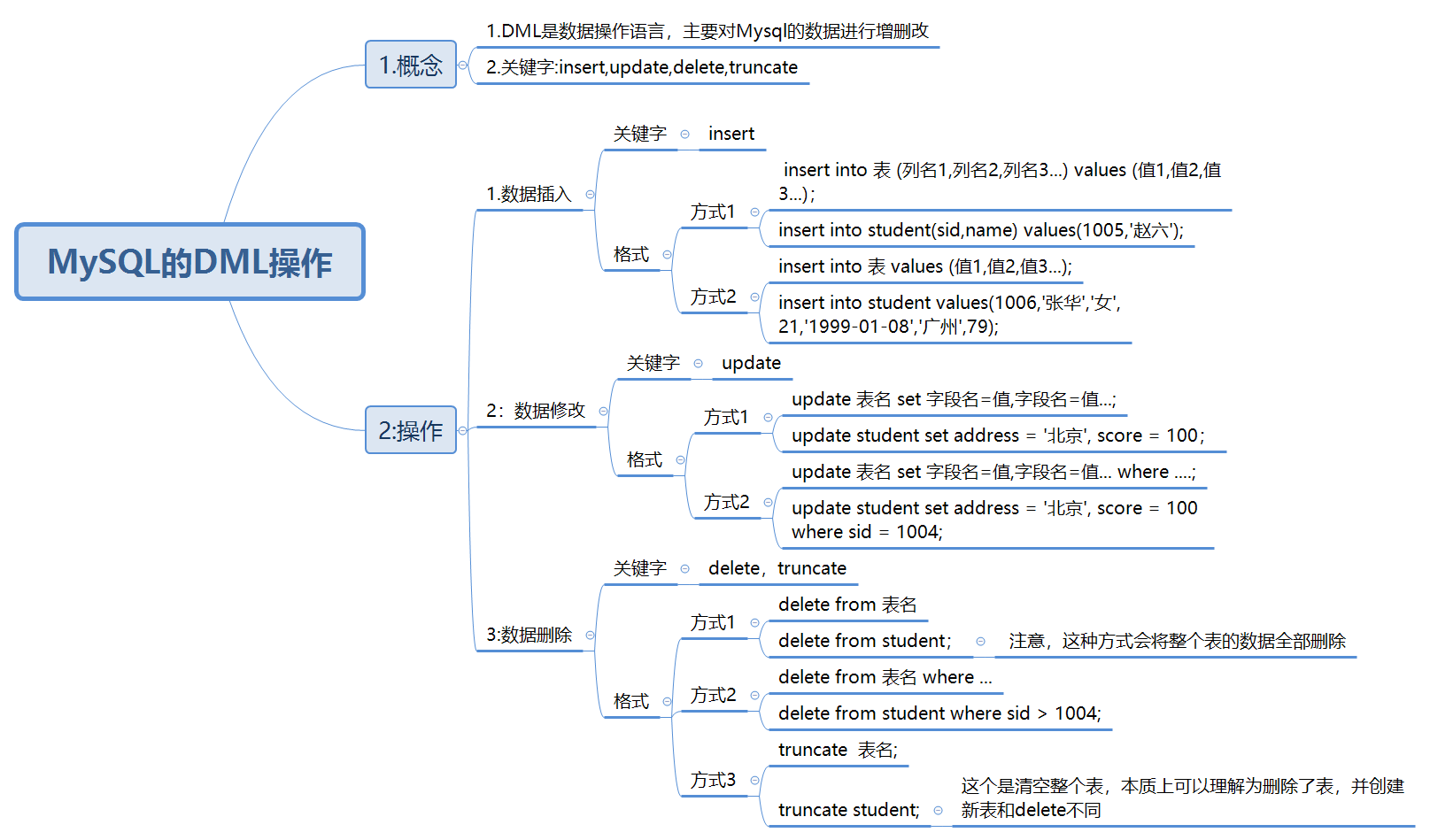
-- 数据插入(指定对应的列) insert into stu (sid,name,gender,age,birth,address) values(1001,'张三','男',18,'2001-11-01','广州'); -- 一次添加多行 insert into stu (sid,name,gender,age,birth,address) values(1002,'王五','男',18,'2001-11-01','广州'), (1004,'lee','男',18,'2001-11-01','广州'); -- 向表中插入所有列 insert into stu values(1005,'张华','男',21,'1999-01-01','广州');
数据修改
1 2 3 4 5 6 7
-- 修改所有学生的地址 update stu set address='深圳'; -- 修改特定id的学生的地址 update stu set address='中国香港' where sid = 1001; update stu set address='中国香港' where sid > 1001; -- 修改特定id的学生的名字和地址(同时修改多列) update stu set address='中国香港',name='wangwu' where sid = 1002;
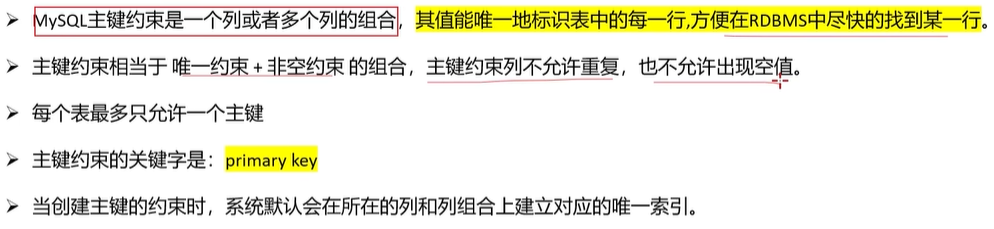
-- 删除主键 -- 1.删除单列主键 alter table emp1 drop primary key; -- 2.删除多列主键 alter table emp5 drop primary key;
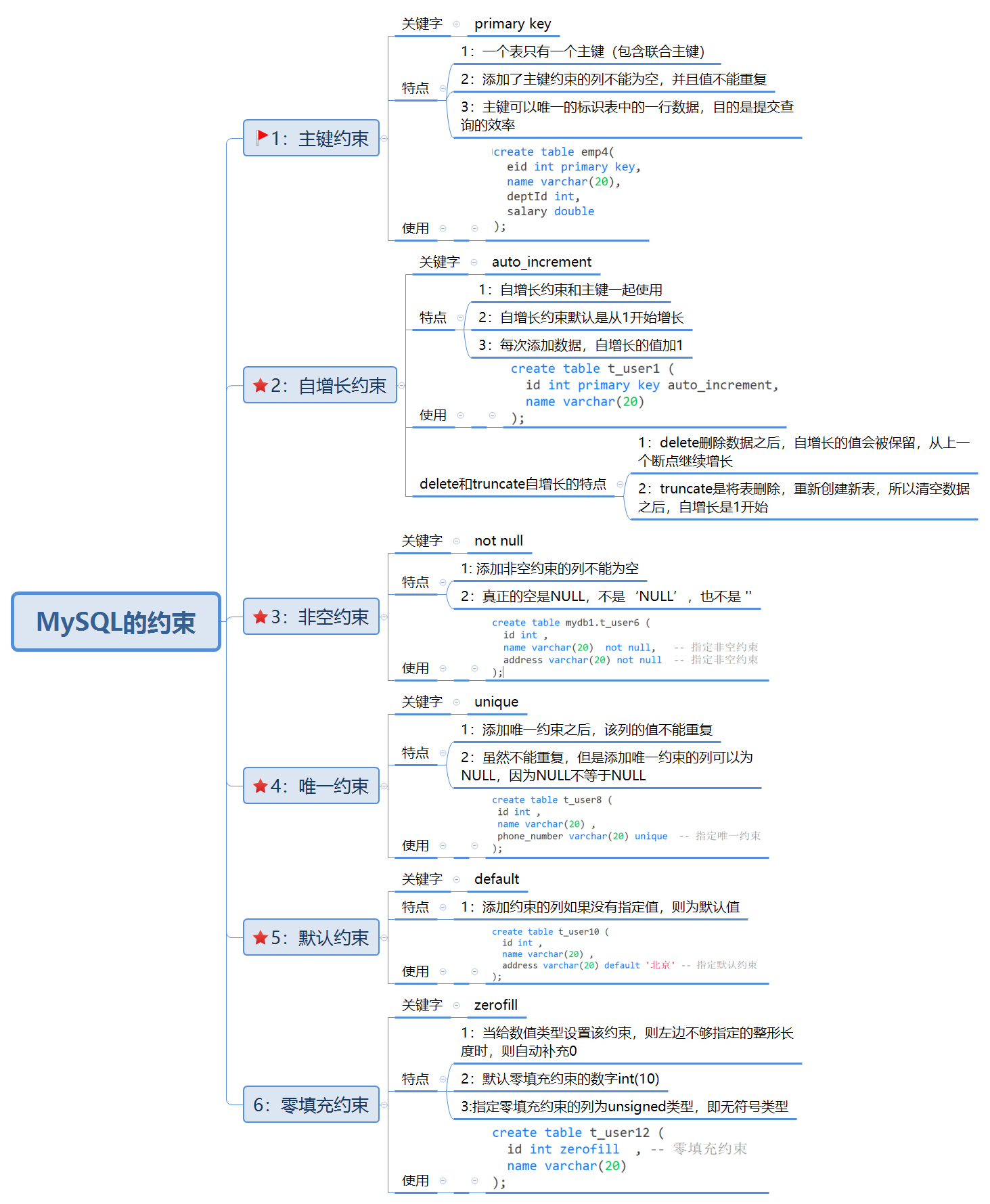
自增长约束
1 2 3 4 5 6 7
-- 自增正约束 create table t_user1 ( id int primary key auto_increment, name varchar(20) ); insert into t_user1 values(NULL,'张三'); insert into t_user1(name) values('李四');
指定自增字段初始值:
1 2 3 4 5 6 7 8 9 10 11 12 13
-- 写法一:创建表时指定 create table t_user2 ( id int primary key auto_increment, name varchar(20) )auto_increment=100; insert into t_user2 values(NULL,'张三'); -- 写法二:创建表之后指定 create table t_user3 ( id int primary key auto_increment, name varchar(20) ); alter table t_user3 auto_increment=100; insert into t_user3 values(NULL,'张三');
1
2
3
4
5
6
7
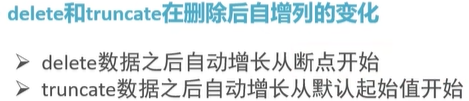
delete from t_user1; -- delete删除数据之后,自增长还是在最后一个值基础上加1 insert into t_user1 values(NULL,'张三'); insert into t_user1(name) values('李四'); #-------------------------------------------------- truncate t_user1; -- truncate删除之后,自增长从1开始 insert into t_user1 values(NULL,'张三'); insert into t_user1(name) values('李四');
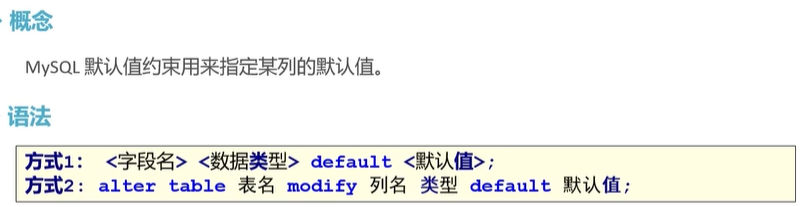
use mydb1; -- 方式1-创建表时指定 create table t_user10 ( id int , name varchar(20) , address varchar(20) default '北京' -- 指定默认约束 ); insert into t_user10(id,name,address) values(1001,'张三','上海'); insert into t_user10 values(1002,'李四',NULL); -- 方式2-创建表之后指定 -- alter table 表名 modify 列名 类型 default 默认值; create table t_user11 ( id int , name varchar(20) , address varchar(20) ); alter table t_user11 modify address varchar(20) default '深圳'; insert into t_user11(id,name) values(1001,'张三'); -- 2.删除默认约束 -- alter table <表名> change column <字段名> <类型> default null; alter table t_user11 modify address varchar(20) default null; insert into t_user11(id,name) values(1002,'李四');
零填充约束
1 2 3 4 5 6 7 8 9 10
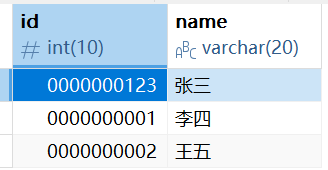
-- 1. 添加约束 create table t_user12 ( id int zerofill , -- 零填充约束 name varchar(20) ); insert into t_user12 values(123, '张三'); insert into t_user12 values(1, '李四'); insert into t_user12 values(2, '王五'); -- 2.删除约束 alter table t_user12 modify id int;
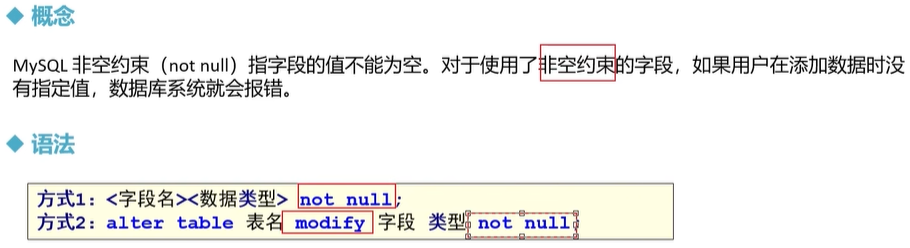
-- 创建数据库表 create database if not exists mydb2; use mydb2; -- 创建商品表 create table product( pid int primary key auto_increment, pname varchar(20) not NULL, price double, category_id varchar(20) ); -- 添加数据 insert into product values(null,'海尔洗衣机',5000,'c001'); insert into product values(null,'美的冰箱',3000,'c001'); insert into product values(null,'格力空调',5000,'c001'); insert into product values(null,'九阳电饭煲',5000,'c001'); insert into product values(null,'啄木鸟衬衣',300,'c002'); insert into product values(null,'恒源祥西裤',800,'c002'); insert into product values(null,'花花公子夹克',440,'c002'); insert into product values(null,'劲霸休闲裤',266,'c002'); insert into product values(null,'海澜之家卫衣',180,'c002'); insert into product values(null,'杰克琼斯运动裤',430,'c002'); insert into product values(null,'兰蔻面霜',300,'c003'); insert into product values(null,'雅诗兰黛精华水',200,'c003'); insert into product values(null,'香奈儿香水',350,'c003'); insert into product values(null,'SK-II神仙水',350,'c003'); insert into product values(null,'资生堂粉底液',180,'c003'); insert into product values(null,'老北京方便面',56,'c004'); insert into product values(null,'良品铺子海带丝',17,'c004'); insert into product values(null,'三只松鼠坚果',88,null);
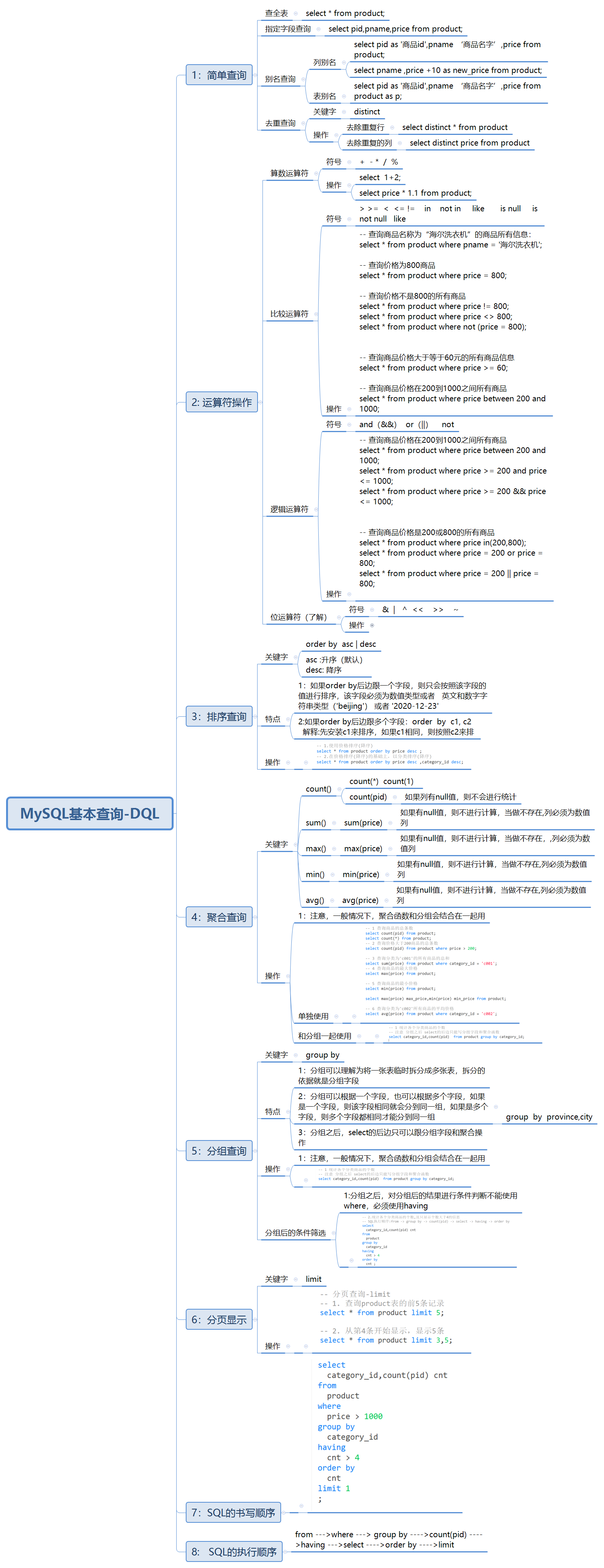
简单查询
1 2 3 4 5 6 7 8 9 10 11 12 13 14
-- 1.查询所有的商品. select * from product; -- 2.查询商品名和商品价格. select pname,price from product; -- 3.别名查询.使用的关键字是as(as可以省略的). -- 3.1表别名: select * from product as p; -- 3.2列别名: select pname as pn from product; -- 4.去掉重复值. select distinct price from product; select distinct * from product;-- 当一张表中某一行的数据与另一行的数据全部相同则把重复的去掉 -- 5.查询结果是表达式(运算查询):将所有商品的价格+10元进行显示. select pname,price+10 from product;
运算符
算术运算符:
算术运算符
说明
+
加法运算
-
减法运算
*****
乘法运算
/或DIV
除法运算,返回商
%或MOD
求余运算,返回余数
比较运算符:
比较运算符
说明
=
等于
<和<=
小于和小于等于
>和>=
大于和大于等于
<=>
安全的等于,两个操作码均为NULL时,其所得值为1;而当一个操作码为NULL时,其所得值为0
<>或!=
不等于
IS NULL或ISNULL
判断一个值是否为 NULL
IS NOT NULL
判断一个值是否不为 NULL
LEAST
当有两个或多个参数时,返回最小值
GREATEST
当有两个或多个参数时,返回最大值
BETWEEN AND
判断一个值是否落在两个值之间
IN
判断一个值是IN列表中的任意一个值
NOT IN
判断一个值不是IN列表中的任意一个值
LIKE
通配符匹配
REGEXP
正则表达式匹配
逻辑运算符:
逻辑运算符
说明
NOT或者!
逻辑非
AND或者&&
逻辑与
OR或者||
逻辑或
XOR
逻辑异或
位运算符:
位运算符
说明
|
按位或
&
按位与
^
按位异或
<<
按位左移
>>
按位右移
~
按位取反,反转所有比特
运算符操作
1
2
3
4
5
6
7
8
9
select 6 + 2; select 6 - 2; select 6 * 2; select 6 / 2; select 6 % 2; -- 将每件商品的价格加10 select pname,price + 10 as new_price from product; -- 将所有商品的价格上调10% select pname,price * 1.1 as new_price from product;
-- 查询商品名称为“海尔洗衣机”的商品所有信息: select * from product where pname = '海尔洗衣机'; -- 查询价格为800商品 select * from product where price = 800; -- 查询价格不是800的所有商品 select * from product where price != 800; select * from product where price <> 800; select * from product where not(price = 800); -- 查询商品价格大于60元的所有商品信息 select * from product where price > 60; -- 查询商品价格在200到1000之间所有商品 select * from product where price >= 200 and price <=1000; select * from product where price between 200 and 1000;
1 2 3 4 5 6 7 8 9 10 11 12 13 14 15 16 17
-- 查询商品价格是200或800的所有商品 select * from product where price = 200 or price = 800; select * from product where price in (200,800); -- 查询含有‘裤'字的所有商品,%用来匹配任意字符 select * from product where pname like ‘%裤%';
-- 查询以‘海’开头的所有商品 select * from product where pname like '海%';
-- 查询第二个字为‘蔻’的所有商品,一个下划线匹配单个字符 select * from product where pname like '_蔻%';
-- 查询category_id为null的商品 select * from product where category_id is null;
-- 查询category_id不为null分类的商品 select * from product where category_id is not null;
使用 MySQL 的 order by 子句来设定你想按哪个字段哪种方式来进行排序,再返回搜索结果。
格式:
1 2 3 4
select 字段名1,字段名2,…… from 表名 order by 字段名1 [asc|desc],字段名2[asc|desc]……
1.asc代表升序,desc代表降序,如果不写默认升序
2.order by用于子句中可以支持单个字段,多个字段,表达式,函数,别名
3.order by子句,放在查询语句的最后面。LIMIT子句除外
1 2 3 4 5 6
-- 1.使用价格排序(降序) select * from product order by price desc; -- 2.在价格排序(降序)的基础上,以分类排序(降序) select * from product order by price desc,category_id asc; -- 3.显示商品的价格(去重复),并排序(降序) select distinct price from product order by price desc;
聚合查询
使用聚合函数查询是纵向查询,它是对一列的值进行计算,然后返回一个单一的值;另外聚合函数会忽略空值。
聚合函数
作用
count()
统计指定列不为NULL的记录行数;
sum()
计算指定列的数值和,如果指定列类型不是数值类型,那么计算结果为0
max()
计算指定列的最大值,如果指定列是字符串类型,那么使用字符串排序运算;
min()
计算指定列的最小值,如果指定列是字符串类型,那么使用字符串排序运算;
avg()
计算指定列的平均值,如果指定列类型不是数值类型,那么计算结果为0
1 2 3 4 5 6 7 8 9 10 11 12
-- 1 查询商品的总条数 select count(*) from product; -- 2 查询价格大于200商品的总条数 select count(*) from product where price > 200; -- 3 查询分类为' c001 '的所有商品的总和 select sum(price) from product where category_id = 'c001'; -- 4 查询商品的最大价格 select max(price) from product; -- 5 查询商品的最小价格 select min(price) from product; -- 6 查询分类为' c002 '所有商品的平均价格 select avg(price) from product where category_id = 'c002';
-- 创建表 create table test_null( c1 varchar(20), c2 int );
-- 插入数据 insert into test_null values('aaa',3); insert into test_null values('bbb',3); insert into test_null values('ccc',null); insert into test_null values('ddd',6); -- 测试 select count(*), count(1), count(c2) from test_null;-- count(1)等价于count(*),结果为 4 4 3 select sum(c2),max(c2),min(c2),avg(c2) from test_null;-- 结果为 12 6 3 4.0000
分组查询
分组查询是指使用group by字句对查询信息进行分组。
格式:
1 2
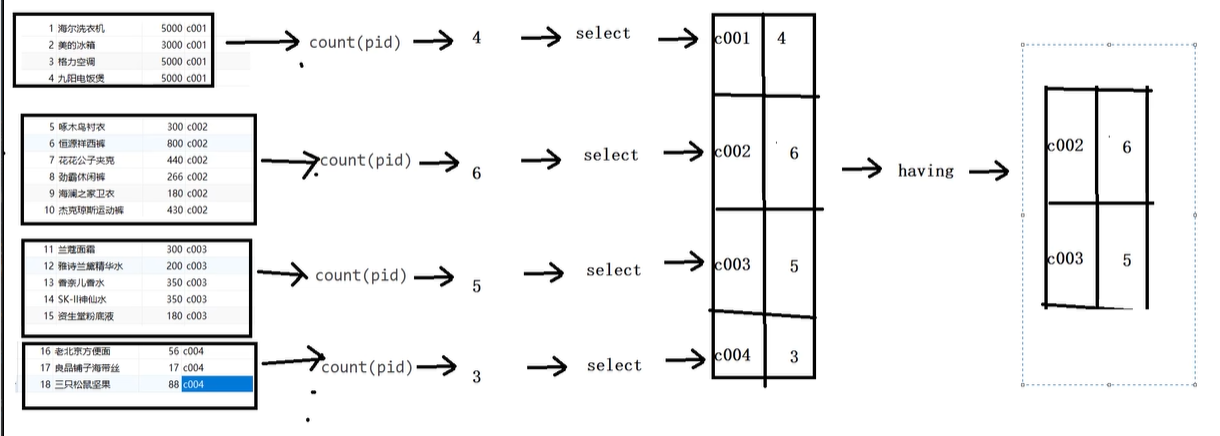
select 字段1,字段2… from 表名 group by 分组字段 having 分组条件; -- 执行顺序:from -> group by -> count(id) -> select -> having -> order by
如果要进行分组的话,则SELECT子句之后,只能出现分组的字段和统计函数,其他的字段不能出现。
分组之后的条件筛选-having:
1、分组之后对统计结果进行筛选的话必须使用having,不能使用where
2、where子句用来筛选 FROM 子句中指定的操作所产生的行
3、group by 子句用来分组 WHERE 子句的输出,group by后面可以跟多个字段,意思是当这些字段都相同时才分到同一组
4、having 子句用来从分组的结果中筛选行
1 2 3 4
-- 1 统计各个分类商品的个数 select category_id ,count(*) from product group by category_id ; -- 2.统计各个分类商品的个数,且只显示个数大于4的信息 select category_id ,count(*) from product group by category_id having count(*) > 1;
-- 方式1-显示前n条 select 字段1,字段2... from 表明 limit n -- 方式2-分页显示 select 字段1,字段2... from 表明 limit m,n -- m: 整数,表示从第几条索引开始,计算方式 (当前页-1)*每页显示条数 -- n: 整数,表示查询多少条数据
操作:
1 2 3 4
-- 查询product表的前5条记录 select * from product limit 5 -- 从第4条开始显示,显示5条 select * from product limit 3,5 -- 第一条索引为0,因此3表示第四条
INSERT INTO SELECT 语句
将一张表的数据导入到另一张表中,可以使用INSERT INTO SELECT语句 。
1 2 3 4 5 6 7 8 9 10 11
insert into Table2(field1,field2,…) select value1,value2,… from Table1 -- 或者: insert into Table2 select * from Table1 select * from product2; #-------------------------------------------------------------- create table product3( category_id VARCHAR(20), product_count int ); insert into product3 select category_id,count(*) from product GROUP BY category_id; select * from product3;
SELECT INTO FROM 语句
将一张表的数据导入到另一张表中,有两种选择 SELECT INTO 和 INSERT INTO SELECT 。
-- 1、添加主表数据 -- 注意必须先给主表添加数据 insert into dept values('1001','研发部'); insert into dept values('1002','销售部'); insert into dept values('1003','财务部'); insert into dept values('1004','人事部');
-- 2、添加从表数据 -- 注意给从表添加数据时,外键列的值不能随便写,必须依赖主表的主键列 insert into emp values('1','乔峰',20, '1001'); insert into emp values('2','段誉',21, '1001'); insert into emp values('3','虚竹',23, '1001'); insert into emp values('4','阿紫',18, '1002'); insert into emp values('5','扫地僧',35, '1002'); insert into emp values('6','李秋水',33, '1003'); insert into emp values('7','鸠摩智',50, '1003'); insert into emp values('8','天山童姥',60, '1005'); -- 不可以
-- 3、删除数据 /* 注意: 1:主表的数据被从表依赖时,不能删除,否则可以删除 2: 从表的数据可以随便删除 */ delete from dept where deptno = '1001'; -- 不可以删除 delete from dept where deptno = '1004'; -- 可以删除 delete from emp where eid = '7'; -- 可以删除
-- 查询每个部门的所属员工 select * from dept3,emp3 where dept3.deptno = emp3.dept_id; select * from dept3 inner join emp3 on dept3.deptno = emp3.dept_id;
-- 查询研发部和销售部的所属员工 select * from dept3,emp3 where dept3.deptno = emp3.dept_id and name in( '研发部','销售部'); select * from dept3 join emp3 on dept3.deptno = emp3.dept_id and name in( '研发部','销售部'); select * from dept3 inner join emp3 on dept3.deptno=emp3.dept_id and name in ('研发部','销售部'); -- 查询每个部门的员工数,并升序排序 select deptno,count(1) as total_cnt from dept3,emp3 where dept3.deptno = emp3.dept_id group by deptno order by total_cnt; select deptno,count(1) as total_cnt from dept3 join emp3 on dept3.deptno = emp3.dept_id group by deptno order by total_cnt;
select deptno,count(*) as cnt from dept3 inner join emp3 on dept3.deptno = emp3.dept_id group by deptno ORDER BY cnt asc;
-- 查询人数大于等于3的部门,并按照人数降序排序 select deptno,count(1) as total_cnt from dept3,emp3 where dept3.deptno = emp3.dept_id group by deptno having total_cnt >= 3 order by total_cnt desc; select deptno,count(1) as total_cnt from dept3 join emp3 on dept3.deptno = emp3.dept_id group by deptno having total_cnt >= 3 order by total_cnt desc;
select deptno,count(1) as cnt from dept3 inner join emp3 on dept3.deptno=emp3.dept_id group by deptno having cnt>=3 order by cnt desc;
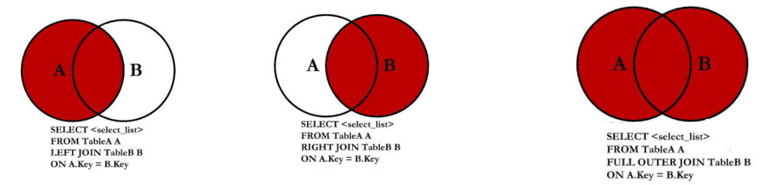
-- 外连接查询 -- 查询哪些部门有员工,哪些部门没有员工 use mydb3; select * from dept3 left outer join emp3 on dept3.deptno = emp3.dept_id; -- 查询哪些员工有对应的部门,哪些没有 select * from dept3 right outer join emp3 on dept3.deptno = emp3.dept_id; -- 使用union关键字实现左外连接和右外连接的并集 select * from dept3 left outer join emp3 on dept3.deptno = emp3.dept_id union select * from dept3 right outer join emp3 on dept3.deptno = emp3.dept_id;
-- 查询年龄最大的员工信息,显示信息包含员工号、员工名字,员工年龄 select eid,ename,age from emp3 where age = (select max(age) from emp3);
select * from emp3 where age=(select max(age) from emp3); -- 查询年研发部和销售部的员工信息,包含员工号、员工名字 select * from emp3 where dept_id in (select deptno from dept3 where name = '研发部' or name = '销售部') ; -- 查询研发部20岁以下的员工信息,包括员工号、员工名字,部门名字 select eid,ename,age,name from (select * from dept3 where name = '研发部') t1 join (select * from emp3 where age <20) t2 on t1.deptno=t2.dept_id;
select eid,ename,name from dept3 a join emp3 b on a.deptno=b.dept_id and a.name='研发部' and b.age<20;
子查询关键字:
1.ALL关键字
格式:
1 2 3
select …from …where c > all(查询语句) -- 等价于: select ...from ... where c > result1 and c > result2 and c > result3
-- 查询年龄大于‘1003’部门任意一个员工年龄的员工信息 select * from emp3 where age > ANY(select age from emp3 where dept_id = '1003'); select * from emp3 where age > some(select age from emp3 where dept_id = '1003');
3.IN关键字
格式:
1 2 3
select …from …where c in(查询语句) -- 等价于: select ...from ... where c = result1 or c = result2 or c = result3
•IN关键字,用于判断某个记录的值,是否在指定的集合中
•在IN关键字前边加上not可以将条件反过来
操作:
1 2 3 4 5
-- 查询研发部和销售部的员工信息,包含员工号、员工名字 select eid,ename from emp3 where dept_id in (select deptno from dept3 where name = '研发部' or name = '销售部') ;
-- 查询不在研发部和不在销售部的员工信息,包含员工号、员工名字 select eid,ename from emp3 where dept_id not in (select deptno from dept3 where name = '研发部' or name = '销售部') ;
-- 查询公司是否有大于60岁的员工,有则输出 select * from emp3 a where exists(select * from emp3 b where a.age > 60); -- 注意这里是a.age而不是b.age,否则会输出emp3表中的全部员工 -- 查询有所属部门的员工信息 select * from emp3 a where exists(select * from dept3 b where a.dept_id = b.deptno);
-- 添加数据 insert into t_sanguo values(1,'刘协',NULL); insert into t_sanguo values(2,'刘备',1); insert into t_sanguo values(3,'关羽',2); insert into t_sanguo values(4,'张飞',2); insert into t_sanguo values(5,'曹操',1); insert into t_sanguo values(6,'许褚',5); insert into t_sanguo values(7,'典韦',5); insert into t_sanguo values(8,'孙权',1); insert into t_sanguo values(9,'周瑜',8); insert into t_sanguo values(10,'鲁肃',8); -- 进行关联查询 -- 1.查询每个三国人物及他的上级信息,如: 关羽 刘备 select * from t_sanguo a, t_sanguo b where a.manager_id = b.eid;
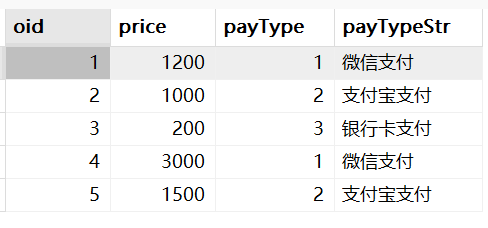
use mydb4; -- 创建订单表 create table orders( oid int primary key, -- 订单id price double, -- 订单价格 payType int -- 支付类型(1:微信支付 2:支付宝支付 3:银行卡支付 4:其他) ); insert into orders values(1,1200,1); insert into orders values(2,1000,2); insert into orders values(3,200,3); insert into orders values(4,3000,1); insert into orders values(5,1500,2);
-- 方式1 select * , case when payType=1 then '微信支付' when payType=2 then '支付宝支付' when payType=3 then '银行卡支付' else '其他支付方式' end as payTypeStr from orders; -- 方式2 select * , case payType when 1 then '微信支付' when 2 then '支付宝支付' when 3 then '银行卡支付' else '其他支付方式' end as payTypeStr from orders;
结果:
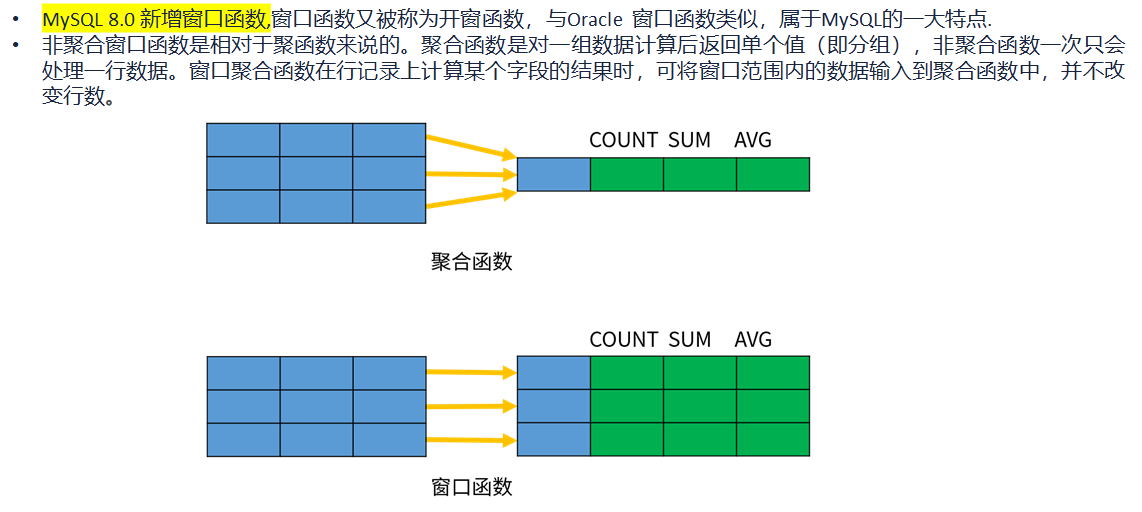
🌟窗口函数
语法结构:
1 2 3 4 5
window_function ( expr ) OVER ( PARTITION BY ... ORDER BY ... frame_clause )
insert into employee values('研发部','1001','刘备','2021-11-01',3000); insert into employee values('研发部','1002','关羽','2021-11-02',5000); insert into employee values('研发部','1003','张飞','2021-11-03',7000); insert into employee values('研发部','1004','赵云','2021-11-04',7000); insert into employee values('研发部','1005','马超','2021-11-05',4000); insert into employee values('研发部','1006','黄忠','2021-11-06',4000); insert into employee values('销售部','1007','曹操','2021-11-01',2000); insert into employee values('销售部','1008','许褚','2021-11-02',3000); insert into employee values('销售部','1009','典韦','2021-11-03',5000); insert into employee values('销售部','1010','张辽','2021-11-04',6000); insert into employee values('销售部','1011','徐晃','2021-11-05',9000); insert into employee values('销售部','1012','曹洪','2021-11-06',6000);
-- 对每个部门的员工按照薪资排序,并给出排名(实际上不是排名,而是每组中的行的序号) select dname, ename, salary, row_number() over(partition by dname order by salary desc) as rn from employee;
-- 对每个部门的员工按照薪资排序,并给出排名 rank select dname, ename, salary, rank() over(partition by dname order by salary desc) as rn from employee;
-- 对每个部门的员工按照薪资排序,并给出排名 dense-rank select dname, ename, salary, dense_rank() over(partition by dname order by salary desc) as rn from employee;
-- 求出每个部门薪资排在前三名的员工- 分组求TOPN select * from ( select dname, ename, salary, dense_rank() over(partition by dname order by salary desc) as rn from employee )t where t.rn <= 3;
-- 对所有员工进行全局排序(不分组) -- 不加partition by表示全局排序 select dname, ename, salary, dense_rank() over( order by salary desc) as rn from employee;
-- 如果没有order by排序语句,默认把分组内的所有数据进行sum操作,结果表中的sum值的每一行的值为前几行的累加值再加上本行的值的和 select dname, ename, salary, sum(salary) over(partition by dname order by hiredate) as pv1 from employee; -- rows between unbounded preceding and current row 表示求和时从开头加到当前行(默认就是这样) select dname, ename, salary, sum(salary) over(partition by dname order by hiredate rows between unbounded preceding and current row) as c1 from employee; -- rows between 3 preceding and current row 表示当前行的求和结果为过去的三行的salary值求和再加上当前行的salary值的和 select dname, ename, salary, sum(salary) over(partition by dname order by hiredate rows between 3 preceding and current row) as c1 from employee; -- 从过去的第三行到接下来的一行的salary值的求和 select dname, ename, salary, sum(salary) over(partition by dname order by hiredate rows between 3 preceding and 1 following) as c1 from employee; -- 从后往前累加,其实就是默认的累加顺序反过来 select dname, ename, salary, sum(salary) over(partition by dname order by hiredate rows between current row and unbounded following) as c1 from employee;
3.分布函数
CUME_DIST
• 用途:分组内小于、等于当前rank值的行数 / 分组内总行数
• 应用场景:查询小于等于当前薪资(salary)的比例
操作:
1 2 3 4 5 6 7 8 9 10 11 12 13 14
/* rn1: 没有partition,所有数据均为1组,总行数为12, 第一行:小于等于3000的行数为3,因此,3/12=0.25 第二行:小于等于4000的行数为5,因此,5/12=0.4166666666666667 rn2: 按照部门分组,dname='研发部'的行数为6, 第一行:研发部小于等于3000的行数为1,因此,1/6=0.16666666666666666 */ select dname, ename, salary, cume_dist() over(order by salary) as rn1, -- 没有partition语句 所有的数据位于一组 cume_dist() over(partition by dname order by salary) as rn2 from employee;
-- lag的用 /* last_1_time: 指定了往上第1行的值,default为'2000-01-01' 第一行,往上1行为null,因此取默认值 '2000-01-01' 第二行,往上1行值为第一行值,2021-11-01 第三行,往上1行值为第二行值,2021-11-02 last_2_time: 指定了往上第2行的值,为指定默认值 第一行,往上2行为null 第二行,往上2行为null 第四行,往上2行为第二行值,2021-11-01 第七行,往上2行为第五行值,2021-11-02 */ select dname, ename, hiredate, salary, lag(hiredate,1,'2000-01-01') over(partition by dname order by hiredate) as last_1_time, lag(hiredate,2) over(partition by dname order by hiredate) as last_2_time from employee;
-- lead的用法 select dname, ename, hiredate, salary, lead(hiredate,1,'2000-01-01') over(partition by dname order by hiredate) as last_1_time, lead(hiredate,2) over(partition by dname order by hiredate) as last_2_time from employee;
-- 注意,如果不指定ORDER BY,则进行排序混乱,会出现错误的结果 -- 这里的每一个first都是分组中的第一个值,而由于是从上往下累计的并且是升序排列,所以last是当前员工的salary的值 select dname, ename, hiredate, salary, first_value(salary) over(partition by dname order by hiredate) as first, last_value(salary) over(partition by dname order by hiredate) as last from employee;
6.其他函数
NTH_VALUE(expr,n)
•用途:返回窗口中第n个expr的值。expr可以是表达式,也可以是列名
•应用场景:截止到当前薪资,显示每个员工的薪资中排名第2或者第3的薪资
1 2 3 4 5 6 7 8 9
-- 查询每个部门截止目前薪资排在第二和第三的员工信息
select
  dname,
  ename,
  hiredate,
  salary,
  nth_value(salary,2) over(partition by dname order by salary DESC) as second_score,
  nth_value(salary,3) over(partition by dname order by salary DESC) as third_score
from employee;
-- 根据入职日期将每个部门的员工分成3组
select
  dname,
  ename,
  hiredate,
  salary,
ntile(3) over(partition by dname order by  hiredate  ) as rn
from employee;

-- 取出每个部门的第一组员工
select
*
from
(
    SELECT
        dname,
        ename,
        hiredate,
        salary,
    NTILE(3) OVER(PARTITION BY dname ORDER BY  hiredate  ) AS rn
    FROM employee
)t
where t.rn = 1;